Invoicing software for freelancers and small businesses
Better than Excel, simpler than accounting software. Create invoices and quotes with your own logo, numbered automatically and with the VAT worked out. Free for 3 invoices a month, or one flat monthly price with no limit on invoices.
Free 30-day trial
Cancel any day
iOS and Android apps
Support via WhatsApp
What does invoicing software do?
Invoicing software keeps your customer details, products and invoices together. Select a customer, enter the products or services you supplied and create an invoice to send. When another project comes along, reuse the information you saved. That means less copying of old documents, retyping amounts and keeping track of separate files for each customer.
Factuur Simpel is for freelancers and small businesses in the Netherlands and Belgium who send their own invoices and quotes and leave the bookkeeping to their accountant. It is the step up from Word or Excel: customers, products and invoices in one place, with the next invoice number and your logo added automatically. From Starter, it also sends recurring invoices for you on a schedule you set. The app works in English; invoice PDFs use Dutch labels and euros. If you want to do your own bookkeeping or need several users, accounting software is a better fit.
From customer details to a sent invoice
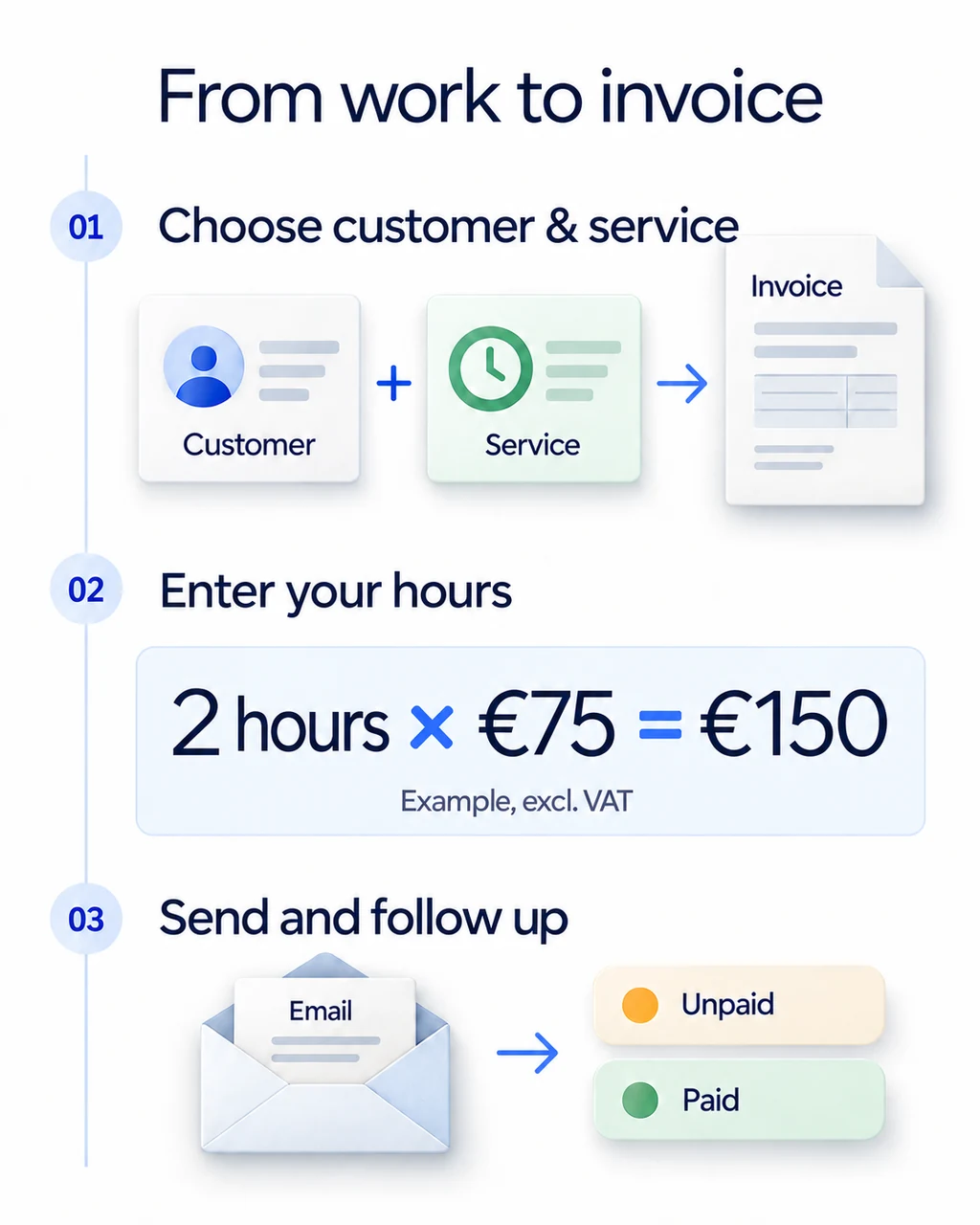
Set up your business and branding
Enter your business details and add your logo and background. Save customers and the products or services you use often. For example, store a description of your usual service as a product. When you create the next invoice, reuse those details and adjust them to match the work you completed.
Turn your work into a clear invoice
Select your customer and add the products or services you delivered, with quantities, prices and the applicable VAT rate. Factuur Simpel calculates the amounts for you. The invoice shows your customer what the work covers and how the total is made up. Review the details and it is ready to send.
Send it and keep track
Send the invoice by email, or use Peppol when your business is connected and your customer can receive invoices through the network. Find your invoices in your account and keep track of outstanding payments. If a customer asks about a particular invoice later, you can return to it without searching through separate documents.
Features for day-to-day invoicing
The features you will use most in day-to-day invoicing.
Invoices in your own branding
Upload your logo and background once and every invoice and quote gets the same professional layout. Branding, customer management and product management are included in every plan.
VAT calculated automatically
Enter quantities, prices and the VAT rate; Factuur Simpel works out the lines and totals. Complete also gives you a VAT overview to prepare your return.
Online payment through a payment link
Connect your Mollie account in Complete and add a payment link to your invoices. Customers pay online without retyping details. Mollie charges its own transaction fees.
Invoice from your phone
Create an invoice right after the job in the iOS or Android app and continue in the web app at your desk. Everything lives in the same account, also with Starter.
From quote to invoice
Create a quote with the same customers and products as your invoices. Once your customer agrees, convert the quote into an invoice and every line comes along automatically.
Expenses and receipts in one place
Keep receipts and expenses next to your invoices so your records are complete. Export everything when your accountant asks. Unlimited, in every plan.
Required invoice details, filled in for you
Tax rules set out what an invoice must show, such as your VAT number, a unique sequential invoice number and the VAT per rate. Our guide lists the required details and the exceptions.
The full invoice requirements checklist
Check your tax authority for the full list that applies to you.
How Factuur Simpel helps
Your business and customer details appear on every invoice automatically. Each new invoice gets the next number in your sequence and VAT is calculated per line. You only fill in what you delivered.
Send and receive e-invoices through Peppol
Send and receive structured e-invoices from your own account, on every plan. With Peppol, invoice data reaches the software used by connected customers. Keep the exchange of invoices in one place for both sides. Connect your business to the network and manage regular invoices and Peppol invoices in the same account.
Already using another system, or need to send several invoices together? Read the separate explanations of bulk sending and the API. They will help you assess which workflow fits the process you already use.
Invoicing software or accounting software?
Accounting software handles your entire administration, from bank transactions to tax returns. Invoicing software focuses on the work you do every week: quotes, invoices, customers and expenses. Factuur Simpel is deliberately invoicing software. You see what you have invoiced and what is still unpaid, without bookkeeping knowledge.
Working with an accountant? Then there is no need to pay for an accounting module you won't use. Export your invoices and receipts and hand them over. With Complete you also have a VAT overview at hand when your return is due.
Still choosing between invoicing and accounting software? Compare Factuur Simpel with Moneybird, Billit, e-Boekhouden, Jortt, and Accountable
Which invoicing setup fits your business?
Choose around the work you want to simplify each day. Start with the essentials in Factuur Simpel, Peppol included, then use Complete for additional payment and administration features.
- Work with returning customers or regular services? Save their details and your products. Your next invoice starts with information that is already there, while descriptions and amounts can be adjusted for each project.
- Need invoices and quotes, including when you are away from your desk, and Peppol e-invoices? Starter covers the essentials. If you also want online payments through Mollie, a bank connection or a VAT overview, choose Complete.
- Work with an accountant? Export invoices and receipts to share your records. Both subscriptions include exports, so you can use your documents outside Factuur Simpel as well.
How much does the invoicing software cost?
The Free plan includes 3 invoices a month, unlimited quotes and Peppol e-invoicing. For monthly subscriptions purchased through the website, Starter costs €12.99 and Complete costs €21.99 per month, excluding VAT. Starter includes unlimited invoices and quotes. Complete adds features such as the bank connection, the Mollie integration and the VAT overview. Visit the pricing page for the full comparison and annual billing rates. App store purchases have different prices.
Try Factuur Simpel free for 30 days without payment details and create your first invoice with your own details and branding. After the trial, you automatically continue on our free version or choose Starter or Complete; the trial never turns into a paid plan automatically.
| Feature | Starter | Complete |
|---|---|---|
| Unlimited invoices | Included | Included |
| Send and receive via Peppol | Included | Included |
| Your own branding | Included | Included |
| Mobile app | Included | Included |
| VAT overview | Not included | Included |
| Mollie payments | Not included | Included |
Practical help for your next invoice
Make your next invoice easier to manage. These guides cover what an invoice must contain, VAT on your invoices, late payments and e-invoicing, with examples for businesses in the Netherlands and Belgium.
Invoice requirements in the Netherlands and Belgium: checklist
Invoice requirements in the Netherlands and Belgium: all mandatory details with examples, KVK and enterprise numbers, deadlines, reverse charge and Peppol.
Reverse charge VAT in the Netherlands and Belgium, with examples
Reverse charge VAT in the Netherlands (btw verlegd) and Belgium (medecontractant): when it applies, what your invoice must state, with worked examples.
Invoice without VAT: Dutch KOR and Belgian small business rules
When can you send an invoice without VAT in the Netherlands or Belgium? The KOR and small business exemption rules, the required wording and an example.
Invoicing foreign customers: Dutch and Belgian VAT rules compared
Invoicing foreign customers from the Netherlands or Belgium? Learn when VAT is reverse charged, zero-rated or exempt and what each invoice must state.
Peppol registration: how to get and check your Peppol ID
Peppol registration for Belgian and Dutch businesses: which Peppol ID you need (0208, 0106, 9944), how to check it and how to switch providers.
E-invoicing in the Netherlands: rules now and from 2030
Is e-invoicing mandatory in the Netherlands? See the rules for government invoices, the 2030 plan for B2B, the Belgian Peppol mandate and how to prepare.
Free tools: Free invoice generator · Free quote generator · Free credit note generator · VAT calculator · VAT number check · Late payment interest calculator · Peppol ID lookup · UBL invoice viewer · Hourly rate calculator · Structured communication
Frequently asked questions about invoicing software
Can I start without experience using invoicing software?
Yes. Enter your business details, add a customer and create your first invoice. Saved customers and products are ready for your next project. Use the free 30-day trial to try the workflow with your own branding and services.
How is it different from invoicing in Word or Excel?
In Word or Excel, you keep track of invoice numbers, VAT calculations and storage yourself. In Factuur Simpel you select a saved customer and product, each invoice gets the next number automatically and VAT is calculated per rate. Previous invoices stay in the same account.
Is Peppol included in every plan?
Yes. Every plan includes Peppol, with no fee per invoice. Once your business is connected, you can send and receive structured e-invoices through the network. Choose Complete if you also want online payments, a bank connection or the VAT overview.
Can I create invoices on my phone?
Yes. Factuur Simpel has apps for iOS and Android alongside the web app. The mobile app is available with Starter and Complete. Use your account to work on your invoices when you are away from your desk.
Can I share invoices and receipts with my accountant?
Yes. Export your invoices and receipts to send them to your accountant or keep them in your own archive. Exports are included in both Starter and Complete.
Can I create quotes and turn them into invoices?
Yes. Create a quote with the same customers and products as your invoices. Once your customer agrees, convert the quote into an invoice; the lines and customer details come along. Quotes are unlimited in Starter and Complete.
Can I cancel my subscription at any time?
Yes, Factuur Simpel can be cancelled any day. Your subscription stays active until the end of the period you have already paid for. Until then, export your invoices and expenses to Excel or PDF and your customers to Excel or CSV, so you can take everything with you.
Can I track expenses and receipts too?
Yes. Upload receipts and record expenses next to your invoices, unlimited and in every plan. With Complete, uploaded receipts are processed automatically.
Can I switch from Excel or other invoicing software?
Yes. Enter your business details, upload your logo and set up invoice numbering with your own prefix. On your first invoice, adjust the number so the sequence continues from the last invoice in your previous tool. You add customers and products once; importing is not available.
Send your next invoice without Excel
Your logo on every invoice, numbering and VAT taken care of, and an export for your accountant, without accounting software. No payment details needed, and after 30 days you automatically continue on our free version, with 3 invoices a month.
Start for free