

Mollie integration: let customers pay your invoices online
With the Mollie integration your customer pays your invoice online, without retyping your account number and the invoice number. They choose iDEAL | Wero, Bancontact or another method that is active in your Mollie account, and the invoice is marked as paid as soon as Mollie confirms the payment. You connect your own Mollie account, so payments come to you.
No payment details needed. You get every feature for 30 days. Then you choose Complete to keep this feature, or you automatically continue on our free version.
How to connect Mollie to Factuur Simpel
Open Payment methods
In Factuur Simpel, go to Settings > Payment methods, in the web app or in the app on your phone. Under Mollie, choose whether you already have a Mollie account or want to create one. A new account also offers the integration during setup.
Log in to Mollie
If you have an account, choose I already have a Mollie account. You log in to Mollie and give Factuur Simpel permission; there are no API keys to copy.
Or create a free Mollie account
Choose Create Mollie account. We fill in your company details, Mollie only asks for what is missing, and we switch on iDEAL and Bancontact for you.
Mollie checks a new account
If your Mollie account is new, Mollie checks it before customers can pay online. You see the status under Payment methods: choose Create profile there if Mollie still needs a profile, or Continue at Mollie if Mollie asks for more details. We email you once customers can pay online.
What your customer sees: one page to pay your invoice
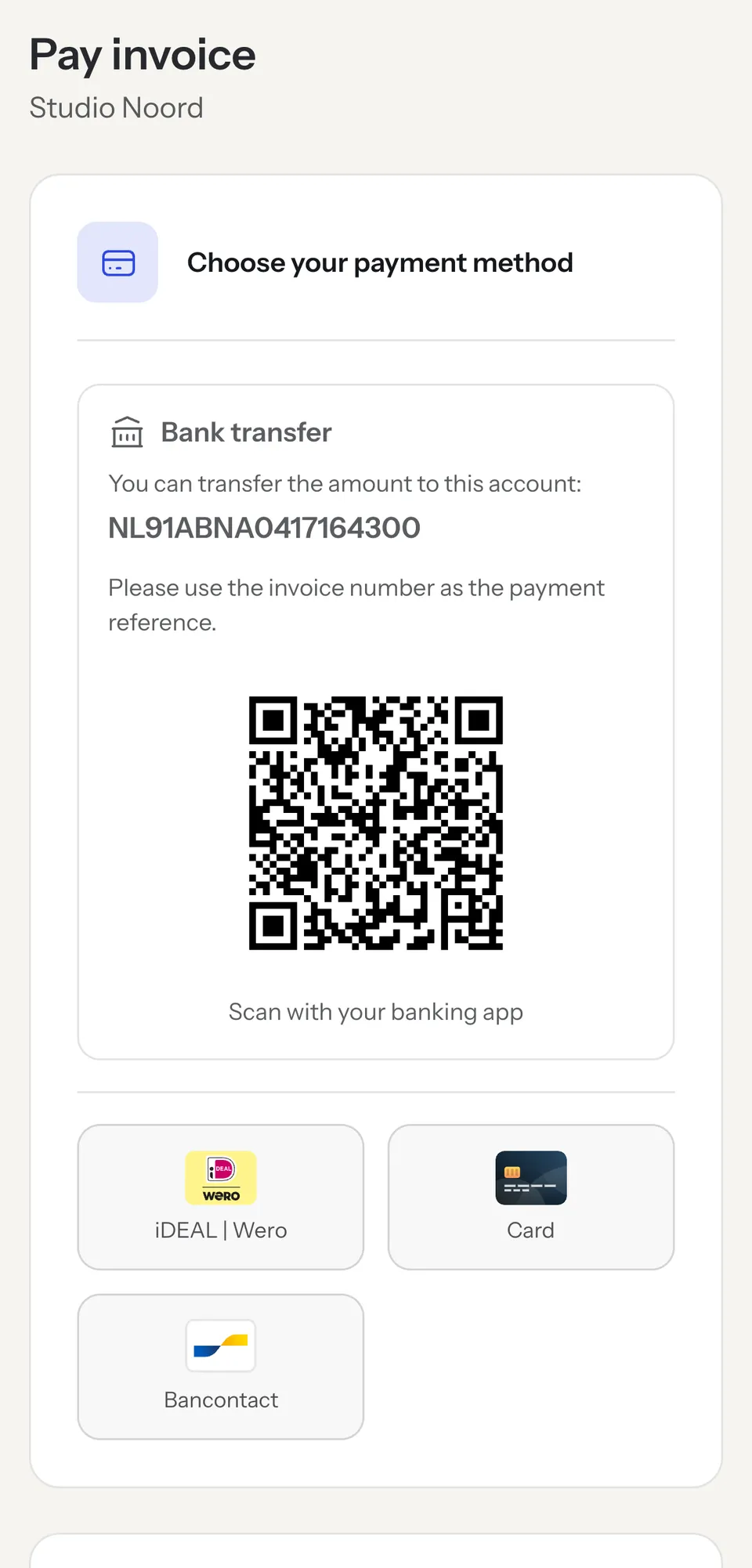
Your customer opens the payment page with the pay button in the email with your invoice, or with the button and QR code on the PDF in the Modern template. There they see the amount, the due date and the PDF, and choose how to pay: with one of the methods Mollie has enabled for you, or by bank transfer to your account number, with a QR code for their banking app.
Factuur Simpel only shows the methods that are active in your Mollie account. To add one, such as card or PayPal, switch it on in your Mollie dashboard. Under Payment methods in Factuur Simpel you see which methods your customers can choose right now.
Paid? Then your invoice is marked as paid
Mollie tells Factuur Simpel as soon as a payment comes in. The invoice is then marked as paid, you get a notification and, if you have their email address, your customer gets a payment confirmation. No more matching bank statements against your invoices.
A paid invoice also gets no automatic payment reminder.
Direct debit, recurring invoices included
If you agree on direct debit with a regular customer, you switch it on per invoice. You enter the customer’s IBAN, confirm that they gave permission, and choose whether Factuur Simpel requests the debit from Mollie right after you finish the invoice or on a date. The invoice then shows a direct debit note instead of a pay button.
On a recurring invoice, Factuur Simpel requests the debit of each new invoice after it is sent, so a subscription or fixed monthly fee collects itself. If a debit fails or your customer reverses it, you are notified and the invoice is open again.
For direct debit, switch on SEPA Direct Debit in your Mollie account and give Factuur Simpel permission to create mandates when you connect.
What does online payment through Mollie cost?
The Mollie integration is part of Complete, at €21.99 per month excl. VAT, and of the 30-day trial. Factuur Simpel charges nothing extra per payment. A Mollie account is free; Mollie charges its own fee per payment, depending on the payment method.
Without Mollie: bank transfer with a QR code
Even without Mollie your customer gets a payment page, on every plan and on our free version. With bank transfer switched on, it shows your account number and a QR code their banking app reads, with the amount and invoice number filled in.
Do your customers mostly pay by transfer? With the bank connection in Complete your transactions come in a few times a day and Factuur Simpel marks paid invoices as paid automatically then too.
Which plan includes the Mollie integration?
The Mollie integration and direct debit are part of Complete and of the 30-day trial. On Starter and our free version, your customer pays by bank transfer.
Free
€0.00 per month
3 invoices per month, after your trial.
- Not included: Online payment through your own Mollie account
- Not included: Direct debit through Mollie
- Not included: Bank connection: paid invoices marked as paid
- Included: 3 invoices per month, unlimited quotes
- Included: Send invoices through Peppol
Starter
€12.99 per month excl. VAT
Or €129.99 per year excl. VAT.
- Not included: Online payment through your own Mollie account
- Not included: Direct debit through Mollie
- Not included: Bank connection: paid invoices marked as paid
- Included: Unlimited invoices
- Included: Send invoices through Peppol
Complete
€21.99 per month excl. VAT
Or €219.99 per year excl. VAT.
- Included: Online payment through your own Mollie account
- Included: Direct debit through Mollie
- Included: Bank connection: paid invoices marked as paid
- Included: Unlimited invoices
- Included: Send invoices through Peppol
Free trial
Free for 30 days
With the Complete features, no payment details.
- Included: Online payment through your own Mollie account
- Included: Direct debit through Mollie
- Included: Bank connection: paid invoices marked as paid
- Included: Unlimited invoices
- Included: Send invoices through Peppol
Website prices. App Store and Google Play prices differ and include VAT. Mollie charges its own fees per payment.
Frequently asked questions
What does the Mollie integration cost?
It is part of Complete, at €21.99 per month excl. VAT, and of the 30-day trial. Factuur Simpel charges nothing extra per payment. A Mollie account is free; Mollie charges its own fee per payment, depending on the payment method.
Do I need a Mollie account already?
No. You can create one for free from Factuur Simpel. We fill in your company details and switch on iDEAL and Bancontact for you. Mollie checks your account before customers can pay online, and we email you once it is ready.
Which payment methods can my customer use?
The methods that are active in your Mollie account, such as iDEAL | Wero, Bancontact and card. You switch on other methods in your Mollie dashboard. If bank transfer is on, your customer can also simply transfer the amount, using the QR code on the payment page.
Can invoices be collected by direct debit?
Yes, on Complete. You switch on direct debit per invoice with your customer’s IBAN and permission, or on a recurring invoice, whose new invoices are then debited after sending. SEPA Direct Debit must be active in your Mollie account. If a debit fails, you are notified and the invoice is open again.
Does the Mollie integration work on Starter or the free version?
No, online payment through Mollie is only part of Complete and the trial. If you move to Starter or our free version, your connection is kept, but customers can no longer pay through Mollie, not even through the payment link in invoices you already sent. Choose Complete again and Mollie switches back on automatically. Until then your customer pays by bank transfer.
Get your next invoice paid online
Try Factuur Simpel free for 30 days with every Complete feature, connect your Mollie account and send your first invoice with a payment link.
No payment details needed. You get every feature for 30 days. Then you choose Complete to keep this feature, or you automatically continue on our free version.