

Time tracking for freelancers: log hours and invoice them
Start the timer when you begin work, or add your hours afterwards, on your laptop or in the app. Factuur Simpel uses the hourly rate of your product and puts a customer’s hours on an invoice in a few clicks. No Excel timesheet and no accounting software.
No payment details needed. You get every feature for 30 days. Then you choose Starter or Complete to keep this feature, or you automatically continue on our free version.
How time tracking works in Factuur Simpel
Log your hours
Start the timer with a short description, or add a date afterwards with a start and end time or just the duration.
Pick the customer and rate
Choose the customer and a product or service; the hourly rate and VAT come from that product. Hours for your own admin are non-billable.
Invoice the hours
Pick a customer with hours that have not been invoiced yet, select the hours and choose how they appear on the invoice.
Review and send
The invoice opens with the lines filled in. You review it and send it by email or through Peppol.
A timer that keeps running on your laptop and phone
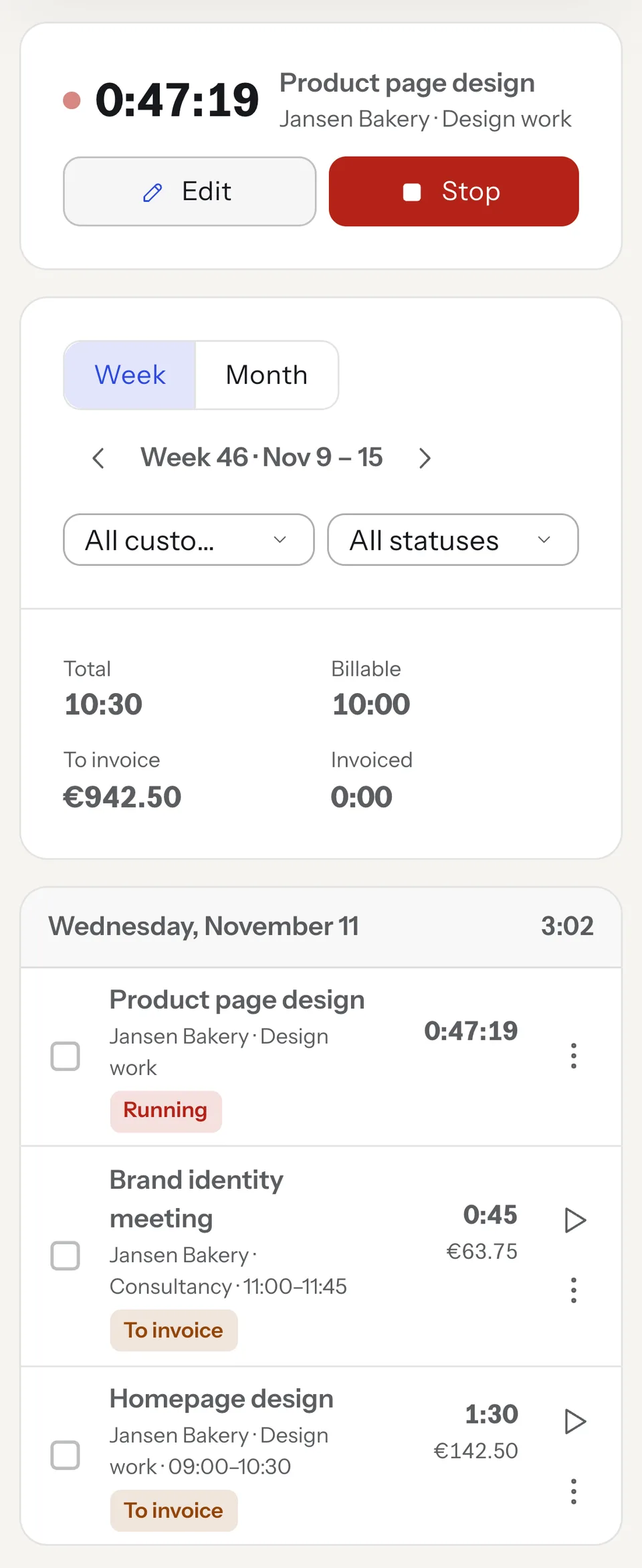
The timer runs on our server, not in your browser. Start it on your laptop, close the tab and stop it later in the app on your phone: the time keeps counting. The top of the screen shows how long it has been running, also while you create an invoice.
Forgot to stop it? When you stop it, a single entry never counts more than 24 hours; just check the time. Carrying on with the same work? Restart the timer in one click from your list of hours.
Add hours afterwards with start and end times or a duration
Forgot the timer? Add your hours afterwards. Pick a date and enter a start and end time, or just the duration, such as 1:30 or 1.5. The description, for example “homepage design”, later appears on your invoice. Work that comes back often, you copy from your list.
By week or by month you see your hours per day, with totals for billable, still to invoice and invoiced. Filter by customer or status to see what is still open for a customer.
Hourly rate from your product, billable or not
Link an entry to a product or service, such as “Design work” or “Consultancy”. The hourly rate and VAT rate then come from that product. If the rate is different for once, you change it per entry, excluding or including VAT.
Hours you don’t charge to a customer, such as admin or finding new clients, are non-billable. They count in your totals but never end up on an invoice.
Your hours on an invoice in a few clicks
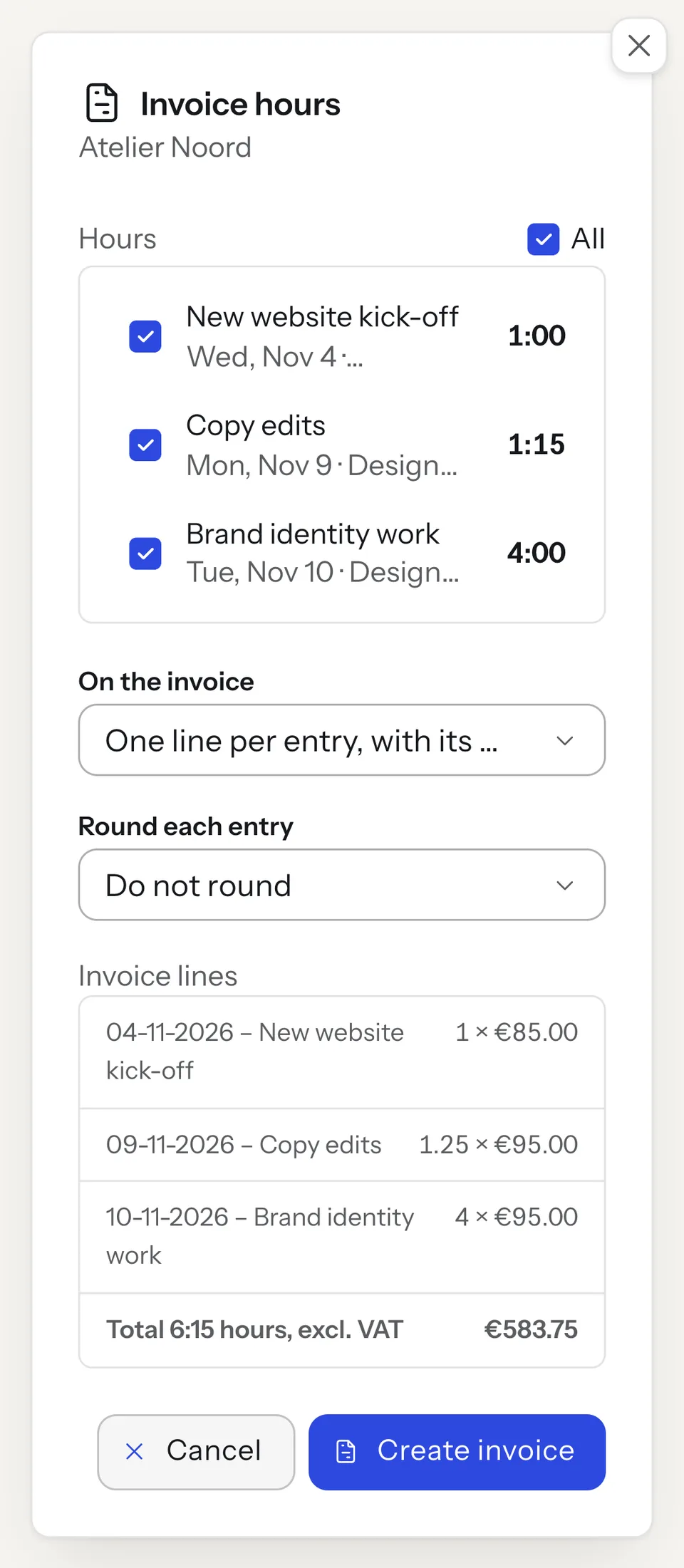
Under “still to invoice” you see how many hours and how much money are still open per customer. Click invoice, select the hours and choose how they appear on the invoice: one line per entry with its date, combined per description or combined per product. To round, each entry is rounded up to 5, 6, 10, 15, 30 or 60 minutes. Your logged time stays as it was.
The hours become the quantity on the invoice line and the hourly rate the price. The invoice opens with the lines filled in, so you review and send it like any other invoice, by email or through Peppol. Invoices print in Dutch or English, in euros. When you create an invoice yourself for a customer with open hours, Factuur Simpel tells you and you add the hours there.
No hours invoiced twice or forgotten
Every entry remembers which invoice it is on. Hours on one invoice can’t be put on another, and you can only change them after removing the line from the invoice. Remove that line or delete the invoice, and the hours are back under still to invoice.
Your dashboard and every customer show how many hours have not been invoiced yet, with the amount. So no work is left that you forget to invoice.
Export your hours to Excel or CSV
Export the hours of a period to Excel or CSV, as a timesheet to go with an invoice, for your accountant or as proof of the hours you worked. Each entry has its date, start and end time, customer, description, product, duration, hourly rate, VAT, amount, whether it is billable, its status and the invoice number. The column headings are in Dutch.
Better than an Excel timesheet
In an Excel timesheet you add up your hours yourself and then type them onto your invoice again. In Factuur Simpel your hours go onto the invoice with their description, rate and VAT, and you see right away which hours are still open. And the timer is on your phone too.
Working with several people, or want to track projects with budgets and planning? Factuur Simpel has one user per account and no projects. A dedicated time tracking tool fits better then.
Which plan includes time tracking?
Time tracking is included in Starter and Complete, and in the 30-day trial. Our free version has no time tracking; hours you already logged stay visible there.
Free
€0.00 per month
3 invoices per month, after your trial.
- Not included: Time tracking with a timer, invoicing hours and export
- Included: 3 invoices per month, unlimited quotes
- Included: iPhone and Android apps
- Included: Send invoices through Peppol
- Not included: Online payments through your own Mollie account
Starter
€12.99 per month excl. VAT
Or €129.99 per year excl. VAT.
- Included: Time tracking with a timer, invoicing hours and export
- Included: Unlimited invoices
- Included: iPhone and Android apps
- Included: Send invoices through Peppol
- Not included: Online payments through your own Mollie account
Complete
€21.99 per month excl. VAT
Or €219.99 per year excl. VAT.
- Included: Time tracking with a timer, invoicing hours and export
- Included: Unlimited invoices
- Included: iPhone and Android apps
- Included: Send invoices through Peppol
- Included: Online payments through your own Mollie account
Free trial
Free for 30 days
With the Complete features, no payment details.
- Included: Time tracking with a timer, invoicing hours and export
- Included: Unlimited invoices
- Included: iPhone and Android apps
- Included: Send invoices through Peppol
- Included: Online payments through your own Mollie account
Website prices. App Store and Google Play prices differ and include VAT.
Frequently asked questions
Can I track my hours in the app?
Yes. Time tracking and the timer work in the web app and in the apps for iPhone and Android, with the same account. The timer runs on our server, so you can start it on your phone and stop it on your laptop.
How do I put my hours on an invoice?
Under “still to invoice”, click invoice next to the customer, select the hours and choose one line per entry or combine the hours per description or per product. The invoice opens with the lines filled in: the hours as quantity and the hourly rate as price. You review the invoice and send it yourself.
Can I round hours on the invoice?
Yes. Each entry can be rounded up to 5, 6, 10, 15, 30 or 60 minutes on the invoice. That only changes the invoice line; the logged time stays as it was.
Can I invoice the same hours twice by mistake?
No. Hours on one invoice can’t be put on another invoice. Remove the line from the invoice or delete the invoice, and you can invoice the hours again.
Can I export my hours?
Yes. You export the hours of a period to Excel or CSV, with the date, times, customer, description, hours, hourly rate, amount and invoice number of each entry. The column headings are in Dutch.
Which plan includes time tracking?
Starter (€12.99 per month) and Complete (€21.99 per month), excluding VAT, and the 30-day trial. Our free version has no time tracking.
Can I track the hours of employees?
No. Factuur Simpel has one user per account and is made for freelancers who invoice their own hours. To track a team’s hours or projects with budgets, choose a dedicated time tracking tool.
Invoice this week’s hours
Track your hours with the timer or afterwards and put them on an invoice in a few clicks. Try Factuur Simpel free for 30 days, no payment details needed.
No payment details needed. You get every feature for 30 days. Then you choose Starter or Complete to keep this feature, or you automatically continue on our free version.